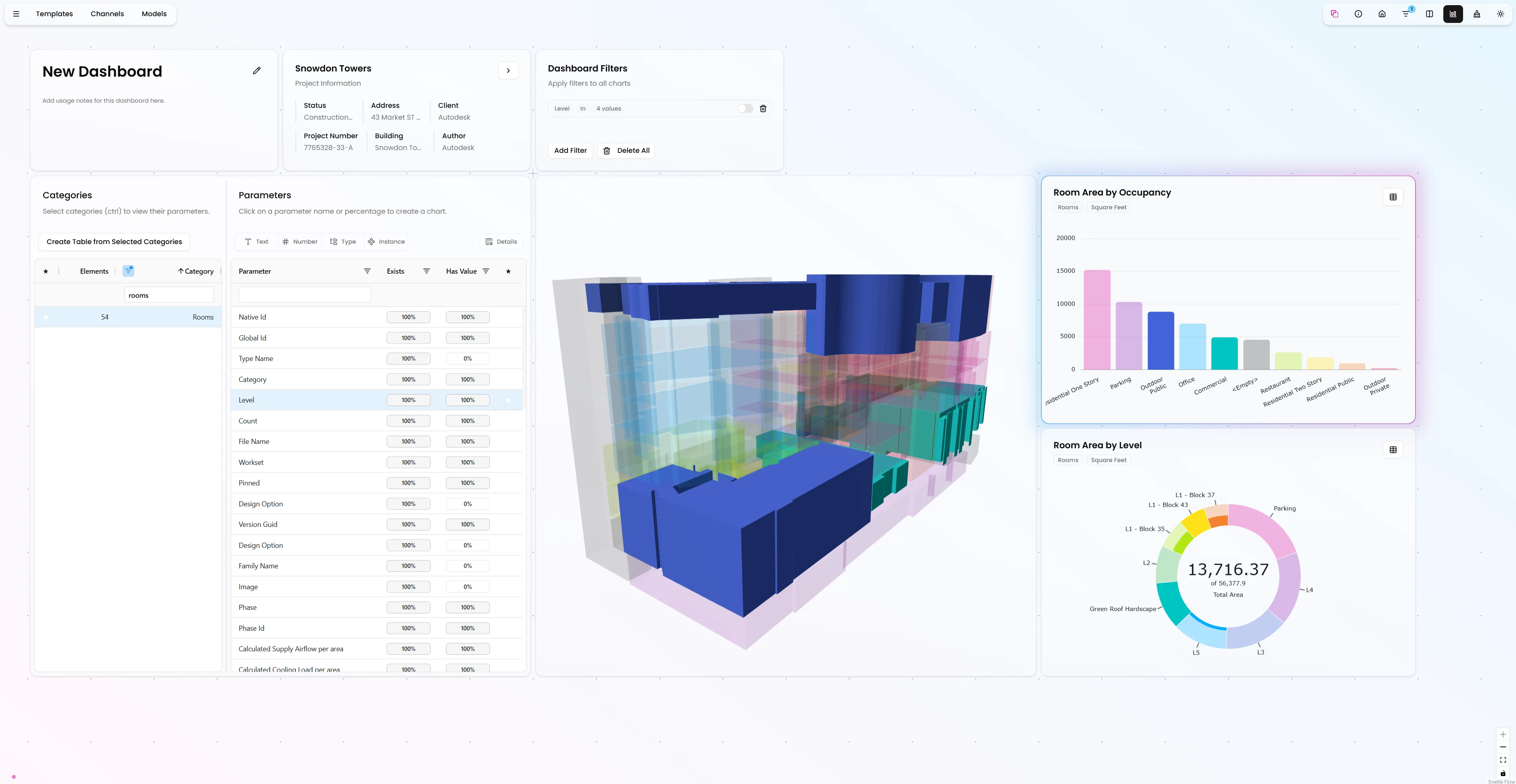
You've built your dashboard in Vyssuals. You've set up your charts, configured your filters, and everything looks perfect. But now you need to share it with someone who doesn't have Revit open—maybe a project manager, a client, or a team member working remotely.
Until now, sharing meant either exporting static screenshots or requiring everyone to have Revit running. That's not how modern collaboration should work.
Shared Dashboards changes all of that.
The Problem: Collaboration Requires Revit
Traditional BIM workflows tie everything to Revit. If you want to share your analysis, you need to:
- Export screenshots that become outdated immediately
- Require everyone to have Revit installed and running
- Share Revit files that are too large to email
- Deal with version conflicts when multiple people work on the same file
This creates friction. Project managers who don't regularly use Revit can't easily check model quality. Clients can't review progress without installing complex software. Remote team members can't collaborate effectively.
We need a better way.
What Are Shared Dashboards?
Shared Dashboards are web-accessible versions of your Vyssuals dashboards that work completely independently from Revit. Once you push your model to the cloud, you can share a dashboard URL with anyone—and they can view, interact with, and validate your BIM data without ever opening Revit.
Key features:
- Disconnected from Revit: Close Revit, shut down the connector—the dashboard keeps working
- Web-based: Access from any browser, anywhere
- Secure sharing: Login-protected with organization and external member support
- Full functionality: All the analysis capabilities you have in Revit, available on the web
- Template integration: Save shared dashboards as templates for team-wide use
How Shared Dashboards Work: The Complete Workflow
Step 1: Push Your Model to the Cloud
Start with Vyssuals connected to Revit. You have your model loaded with all the categories you need. From the Models section, select a project (or create a new one), then push your Revit file to the cloud server.
What happens: Vyssuals extracts all the geometry and data from your Revit file and converts it into a much smaller, more compact format—without losing any data. This optimized format is what powers the web dashboard.
Step 2: Create Your Dashboard
Once your model is in the cloud, create a new dashboard. Name it something meaningful—"Project Status" or "Quality Check"—and open it. You can load a template if you have one, or start fresh. This model is now available without Revit.
Step 3: Build Your Analysis
Now you can do everything you could do when connected to Revit, but on a web dashboard. Create charts, color the 3D model by properties, filter by level or category, analyze room occupancy, wall counts, door types—whatever you need.
Pro tip: This is your chance to set up the dashboard exactly how you want it before sharing. Think about what your collaborators need to see and configure the dashboard accordingly.
Step 4: Share Your Dashboard
To add collaborators, you have two options:
For external members (clients, consultants, anyone outside your organization): Click the manage icon and add their email address. They'll receive access to this specific dashboard. While the can make changes to the dashboard, the changes will not be saved.
For organization members: If you have an organization account, everyone in your organization can access the dashboard by default. No need to add them individually. When these folks change things on the dashboard, it will be saved.
To share: Simply copy the dashboard URL and send it to them via email, Teams, Slack, or whatever communication method you use. The URL is login-protected, so they'll need to authenticate—either as an organization member or as an external member you've invited.
Use Case 1: Sharing Insights with Stakeholders
The most obvious use case is sharing a dashboard with someone to give them insight into your model. Show them room areas, wall counts, door types, material quantities—all the data they need to understand the project status.
This is perfect for:
- Client presentations: Show progress without requiring Revit
- Stakeholder updates: Share key metrics and visualizations
- Team collaboration: Let team members review data without opening Revit
Use Case 2: Rule Checking for Non-Revit Users
Here's a powerful use case: Use Shared Dashboards for rule checking with managers who don't regularly open Revit files.
The workflow goes like this:
- A team member pushes the Revit file to the cloud
- The dashboard automatically refreshes with the latest data
- Managers can validate things without ever opening Revit
Example: Floor Offset Validation
Let's say you want to check that all floors have an offset from level of zero. Create a rule chart for category floors, set the rule to "offset from level should be zero," and now you can do your model checks online, completely detached from the Revit file.
Managers can see which floors violate the rule, filter by level, explore the 3D model, and validate the model quality—all without Revit.
Use Case 3: Template-Based Collaboration
Here's where it gets really powerful: If you've found mistakes in the model and want someone working locally on the Revit file to address them, you can save the dashboard as a template.
Save it as an organization template. Then, the person connected to the Revit model can load that template, see the exact same checks, and fix the model accordingly.
This creates a seamless workflow:
- You find issues in the shared dashboard
- You save the dashboard as a template
- They load the template in Revit and see the same checks
- They fix the issues
- You push the updated model and verify the fixes
Pre-made templates can obviously also be used for local and web dashbaords alike.
Why Shared Dashboards Matter
Accessibility
Not everyone needs Revit. Project managers, clients, consultants, and remote team members can now access your BIM data without installing complex software or learning Revit.
Real-Time Collaboration
Dashboards update automatically when you push new model versions. Everyone sees the latest data without manual exports or file sharing.
Security
Login-protected access means you control who sees what. Organization members get automatic access; external members require explicit invitation.
Independence
Work disconnected from Revit. Close it, shut it down, work remotely—your dashboard keeps functioning.
Template Integration
Save shared dashboards as templates to standardize quality checks and analysis workflows across your entire team.
What This Means for Your Workflow
Shared Dashboards transform how you collaborate on BIM data:
- Share insights with stakeholders who don't use Revit
- Enable validation by managers and team members without Revit access
- Standardize quality checks by saving dashboards as templates
- Work remotely without requiring Revit to be running
- Collaborate in real-time with automatic updates when models change
This opens up new possibilities for collaboration. You're no longer limited to people who have Revit installed and running. You can share your analysis with anyone, anywhere, at any time.
Want to see Shared Dashboards in action? Check out our tutorial videos or get started with Vyssuals today.